
E-commerce web development is important for businesses looking to gain some presence in the online market. If we talk about 2024 alone, there are around 27.2 million e-commerce sites, which makes it very easy for your site to get lost in the crowd.
This means you have to develop an e-commerce site that truly stands out. To do that, you’ll understand the basics of it and see what works best for your business.
Octet Solutions is a software house that provides guidance and courses on e-commerce web development for students and businesses.
In this guide, let’s break it down step by step and see what e-commerce development actually means and how you can use it for your own business.
What Is E-Commerce Web Development?
At its core, e-commerce web development is just building a website where people can buy things. Sounds simple, right? But once you get into it, there’s a lot going on behind the scenes.
For example, you’ve got product pages, a shopping cart, checkout, payment processing, inventory tracking, and order management. And all of these need to work together properly. If even one thing breaks, the whole experience falls apart.
Now here’s where it gets interesting. The difference between a good e-commerce site and a bad one isn’t always obvious at first glance. Instead, it shows up in the small things. Like how fast the pages load. How easily can someone find a product? Or whether the checkout actually works smoothly, especially on a phone.
The 4 Types of E-commerce and Why it Matters
Before any developer writes a single line of code, you need to know what kind of store you’re building. The four main models are:
- First, there is B2C, which is when you sell directly to individual customers through an online platform.
- Then we have B2B, where a business sells its product to another business instead, and it could be a manufacturer or provider, etc.
- After that, there is C2C, which is basically people who own something selling it to other people.
- Lastly, D2C is where brands sell directly to their customers and don’t need a third party.
Most small businesses are either B2C or D2C. That shapes everything from how your product catalogue is structured to what payment options you need, to whether you require bulk ordering features at all. Getting this wrong early costs money later.
What Are the 4 C’s of E-commerce?
This is one of those things you’ll see everywhere, so it’s worth understanding what it actually means. All four Cs have different meanings and play their own roles, like:
- First, we have Content; This is everything your customer sees on the product side, your product descriptions, images, and even how you present details. If this part is weak, people lose interest fast.
- Then comes Context. Basically, how the whole experience feels to the user. Is the site easy to use on mobile? Does it match what people expect when they shop online? If it feels off or confusing, people won’t stick around.
- Next is Commerce. This is the actual buying part. The checkout, the payment, the trust factor. If this isn’t smooth, people drop off right at the last step.
- And finally, Community. This is where reviews, repeat customers, and word of mouth come in. It’s what builds trust over time and makes people come back.
So, a store needs to make sure all four Cs are working together for it to succeed. And that’s usually the difference, not between good and bad design, but between a store people return to and one they leave halfway through checkout.
How to Build an E-commerce Website
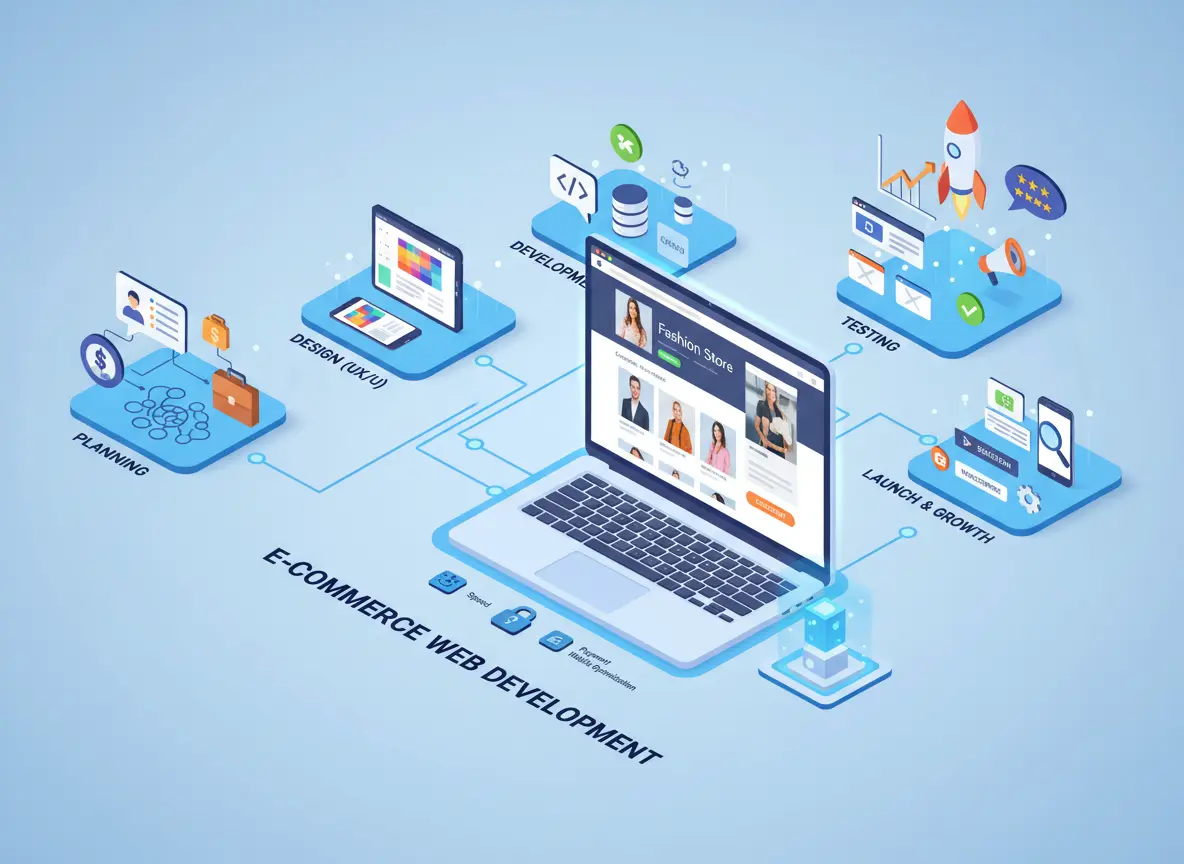
When a development team does it properly, it doesn’t start with design or coding right away. It usually begins with figuring out what the business actually needs, and then building everything step by step from there.
Planning comes first
You map out what you’re selling, who’s buying it, what features you need on day one versus later, and what the budget actually allows. Most projects that go sideways skip this step or rush through it.
Then comes design
Good e-commerce UX design is really just about removing obstacles. Every extra click between a customer and their purchase is a drop-off risk. Mobile design isn’t a bonus feature anymore; more than half of online shopping happens on phones, so it has to work there first.
Development and integration
This is where platforms, payment gateways, and third-party tools get connected. This is also where custom logic gets built, things like discount rules, product configurators, or multi-currency support.
Testing
It happens across every browser and device before anything goes live. Broken checkout on Safari is the kind of thing that costs real money if it slips through.
Launch
Speed improvements, conversion rate testing, and e-commerce SEO are ongoing. A live store is never truly “finished.”
Shopify, WooCommerce, or Custom: Which One Should You Use?
This question comes up in almost every e-commerce project, and the honest answer is that none of them is universally right.
Shopify is fast to launch, well-supported, and requires almost no technical knowledge to manage day-to-day. It suits small to medium stores that want to move quickly. The limits show up when you need something it wasn’t built to do, then you’re fighting the platform instead of building on it.
WooCommerce runs on WordPress and gives you more flexibility without the monthly fees. It’s a good fit if you already have a WordPress site or need a content-heavy store. It does require more maintenance, though.
Custom e-commerce development is for when neither of those fits. If you have complex product logic, unusual integrations, or you’re building at a scale where the platform’s limitations would hurt growth, going custom makes sense. It costs more and takes longer upfront, but you own everything, and it does exactly what you need.
The Shopify vs custom debate and the WordPress vs Shopify comparison only matter in the context of your specific situation. Anyone who gives you a definitive answer without knowing your business is guessing.
How Much Does E-commerce Website Development Cost in 2026?
Ranges are wide here because the scope varies so much.
If you’re setting up a Shopify store yourself, it honestly doesn’t cost that much. You can get a basic theme, plug things in, and be up and running in a few hundred dollars.
But the moment you want it to actually look good and work smoothly, the cost starts creeping up. A proper store, with custom design, integrations, and SEO done right, usually sits somewhere between $3,000 and $15,000. And if you go beyond that, like fully custom features or complex systems, it can get expensive pretty fast.
Same thing with time. A simple store? You can launch it in about 4-6 weeks without too much stress. But if it’s a custom build, it’s not quick. You’re realistically looking at 3-6 months.
And one thing people almost always miss the costs don’t end when the store goes live. You’ve still got hosting, SSL, payment gateway fees, and maintenance running in the background. It’s not huge individually, but together, it adds up over time.
What Makes a Good E-Commerce Website
Speed matters more than most people realise. Slow pages lose customers before they’ve even seen a product. Then, we have security, which matters a lot and isn’t optional. SSL, trusted payment options, and proper data handling are the basics. Without them, people won’t trust your store.
At the same time, good e-commerce sites are considered easy to use if they:
- work on every screen size,
- show products clearly,
- and also dont make you go through a lot of hassle during the checkout procedure.
On top of that, if you want people to trust your brand, reviews and clear return policies will help with that. And then, having a clean site structure makes your site easy to use and makes it more visible on search engines.
That’s exactly why an e-commerce website development checklist matters before launch. It helps catch small but important issues like broken links, missing meta descriptions, slow-loading images, and untested payment flows.
What’s Changing in E-commerce Development in 2026
A few trends in web development worth paying attention to right now.
AI-driven personalisation, product recommendations, dynamic pricing, and smart search are increasingly standard rather than a premium add-on. Headless commerce setups are gaining traction because they’re faster and more flexible. Progressive Web Apps are improving mobile experiences significantly. And more customers are buying through voice search than ever before.
If you’re building something now, building it with scalability in mind means these capabilities can be added later without tearing everything apart.
Your Own Store vs a Marketplace
Selling on Amazon or Etsy gets you in front of customers quickly. But you’re on their platform, by their rules, and your customers are really their customers. The data, the relationship, the brand, none of that belongs to you.
Building your own e-commerce website is a long play. But every sale builds your customer base, your data, and your brand equity. For a business thinking beyond the next six months, owning that channel is worth the investment.
Running both makes sense for a lot of businesses. Just don’t treat the marketplace as your primary channel.
Why Choose Octet for E-commerce Web Development
The right development partner asks questions before they pitch solutions. If someone recommends a platform before understanding your business, that’s worth noting.
Things worth checking: have they built live ecommerce projects, not just portfolios with mockups? Do they communicate clearly and set realistic timelines? Do they offer support after launch or just until delivery?
At Octet Solutions, the approach starts with the business problem, not the tech stack. Whether you’re building your first store or migrating away from a platform that’s holding you back, the team works through what you actually need before writing a line of code.
Conclusion
A business can really say that they made a good investment if they do E-commerce web development the right way. But if it’s done poorly, it’s an expensive lesson. So, the difference usually comes down to planning properly, choosing the right tools for your actual situation, and working with people who’ve actually built this kind of thing before. So, make sure you do proper research and look at what your business goals are to help create a site accordingly.
FAQs
What are the 7 types of e-commerce?
B2C, B2B, C2C, D2C, B2G, G2B, and G2C. Most consumer businesses operate on B2C or D2C models.
How long does an e-commerce website take to build?
A Shopify or WooCommerce store can go live in four to six weeks. A custom build typically takes two to six months, depending on what’s involved.
Can I build an e-commerce website without knowing how to code?
Yes, platforms like Shopify make it possible. But if your store needs anything beyond the basics, a developer will get you much further.
Which platform is best for a small business?
Shopify is the quickest route to market for most small businesses. WooCommerce is worth considering if you want more control without ongoing subscription fees.
How do I pick the right e-commerce development company?
Look for real ecommerce experience, honest timelines, clear pricing, and a team that listens before they start talking solutions.